AlQariAlQari
Agentic Document AI · Arabic-First · Human-in-the-Loop

Turn your documents into trusted data — no manual entry

AI agents read, extract, validate, decide, and act across your systems — agentic document automation with human review where it counts.

Handwriting & scans
Fields & tables extraction
Validation & human review
Workflow automation
AlQariAlQari
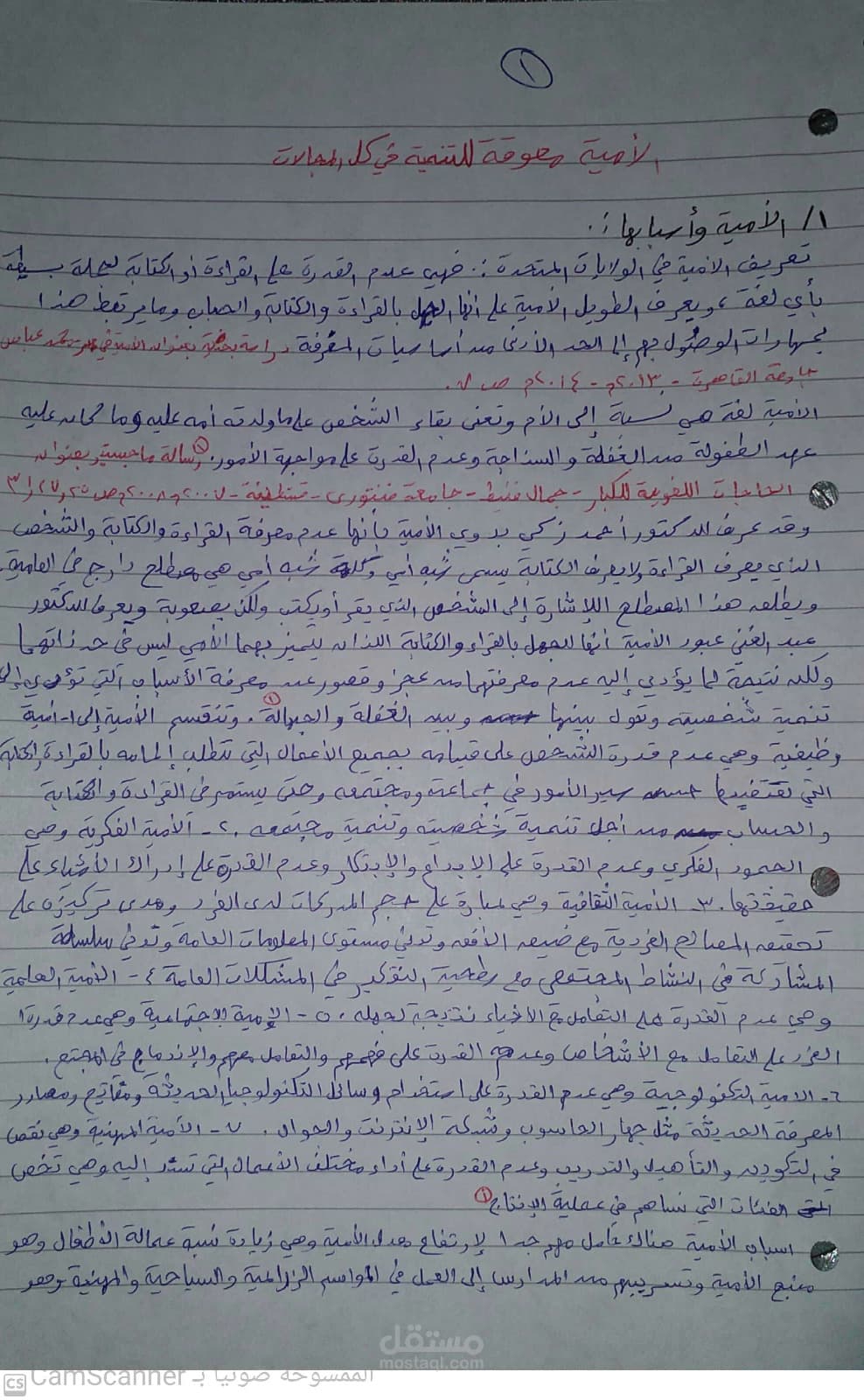
Uploading Arabic handwritten document…
scanned-document-ar.jpg · 0.5 MB
Preparing OCR pipeline
Arabic handwritten document
Pipeline active
OCR → Extract → Validate → JSON
Trusted By
EY
Siemens
Raya IT
Aicom
Innovito
EBLA
Metamas
InfoTimes
LOGIX
TaskNation Arabia
EY
Siemens
Raya IT
Aicom
Innovito
EBLA
Metamas
InfoTimes
LOGIX
TaskNation Arabia
EY
Siemens
Raya IT
Aicom
Innovito
EBLA
Metamas
InfoTimes
LOGIX
TaskNation Arabia
Agentic Workflow

Watch an AI agent run your document workflow, node by node

A real AlQari agentic workflow: read Arabic text, extract fields, validate, decide, and act — with human review built in. Drag nodes and connect them yourself.

Impact

Real numbers, real results

Teams across Saudi Arabia rely on AlQari to process, extract, and review documents faster.

80+
Companies
Finance, operations, and enterprise teams
13K+
Documents Processed
Arabic & English documents
27K+
Pages Extracted
Structured data points captured
99.9% ↑
Platform Reliability
Always-on, enterprise-grade
Why ALQari

Built for Arabic documents at scale

From handwritten archives to scanned PDFs, ALQari turns Arabic and English documents into structured, validated, workflow-ready data.

Beyond OCR: understand, extract, validate, review, and automate.

Arabic & Handwriting

Bilingual OCR for Arabic and English — printed, handwritten, and scanned documents.

Document Understanding

Layout, structure, and context — not just raw characters on a page.

Structured Extraction

Key fields, tables, and line items pulled into clean, structured data.

Validation

Automated checks against your business rules before data is trusted.

Human-in-the-Loop

Route low-confidence or exceptional cases to a reviewer for sign-off.

Agentic Workflows

Chain steps into automated document pipelines that run end to end.

Enterprise Integration

Connect to existing systems via APIs, webhooks, and workflow actions.

Structured Output

Clean JSON with text, confidence scores, and field-level positions.

Encrypted in transit & at rest
No training on your data
Human-in-the-loop review
Full audit trail
REST API & webhooks
Saudi-built

Ready to transform how you handle documents?

Start in minutes — extract data from your first document, no credit card required.

FAQ

Frequently Asked Questions

Got questions? We have answers.

What is AlQari and how is it different from traditional OCR?

AlQari is an Arabic-first document intelligence platform. Traditional OCR only converts an image into raw text, whereas AlQari reads the document, extracts structured fields and tables, validates the results, routes uncertain data to human review, and returns clean JSON your systems can act on. In short, it turns documents into trusted, ready-to-use data rather than just recognizing characters.

Can AlQari read Arabic handwriting and scanned documents?

Yes. AlQari processes printed text, handwriting, and scanned PDFs in Arabic and English within a single pipeline, with right-to-left and contextual understanding built in. Its models are purpose-built for Arabic handwriting and scans, though recognition accuracy naturally depends on scan quality, handwriting clarity, and the condition of the original document.

What languages does AlQari support?

AlQari supports Arabic and English document processing, including bilingual documents that mix both scripts. It is built Arabic-first, with right-to-left layout handling and contextual understanding, so it reads Arabic content as reliably as English rather than treating it as an afterthought.

What data can AlQari extract from documents?

AlQari extracts text, key fields, and tables, and returns them as structured JSON with confidence scores and bounding boxes for each field. This lets you capture the specific values you need — such as names, dates, amounts, and line items — and map them directly into your applications instead of re-keying data by hand.

How does human-in-the-loop validation work?

AI extracts and validates the data first, then anything that needs a second look can be routed to a person for review. A human confirms or corrects the flagged values, and only validated data continues through the workflow. This keeps automation fast while giving your team control over accuracy on the documents that matter most.

Can AlQari integrate with our existing systems?

Yes. AlQari provides a REST API and webhooks, so you can submit documents programmatically and receive structured results in your own applications and workflows. Results are returned as JSON, and webhooks let downstream systems act on extracted data automatically. See the API documentation at /api-docs for endpoints and request formats.

How does AlQari handle document security and customer data?

Your documents are encrypted in transit and at rest, protected by access controls, and tracked with a full audit trail. AlQari does not train its AI models on your data without explicit consent. For more detail on how data is handled, see the privacy policy at /privacy.

What file formats does AlQari support?

AlQari accepts common document and image formats, including PDF, PNG, JPG, and JPEG files. You can upload a scanned PDF or a photo of a document, and AlQari will run OCR and extraction across its pages and return structured results.

Can AlQari automate an end-to-end document workflow?

Yes. You can build agentic workflows where a document is ingested, run through OCR, extracted into fields, validated, sent to human review when needed, and delivered as structured output to downstream systems. You connect the steps visually, so a document can move from upload to a finished, automated result without manual data entry.

How does AlQari pricing work?

AlQari offers both plan-based and usage-based pricing, so you can start on a free tier and scale as your document volume grows. You only pay for what you process, and you can review current plans and rates on the pricing page at /pricing.